What Happens Inside a Waapper Multi-Agent Inbox on a Sale Day: A Full Breakdown
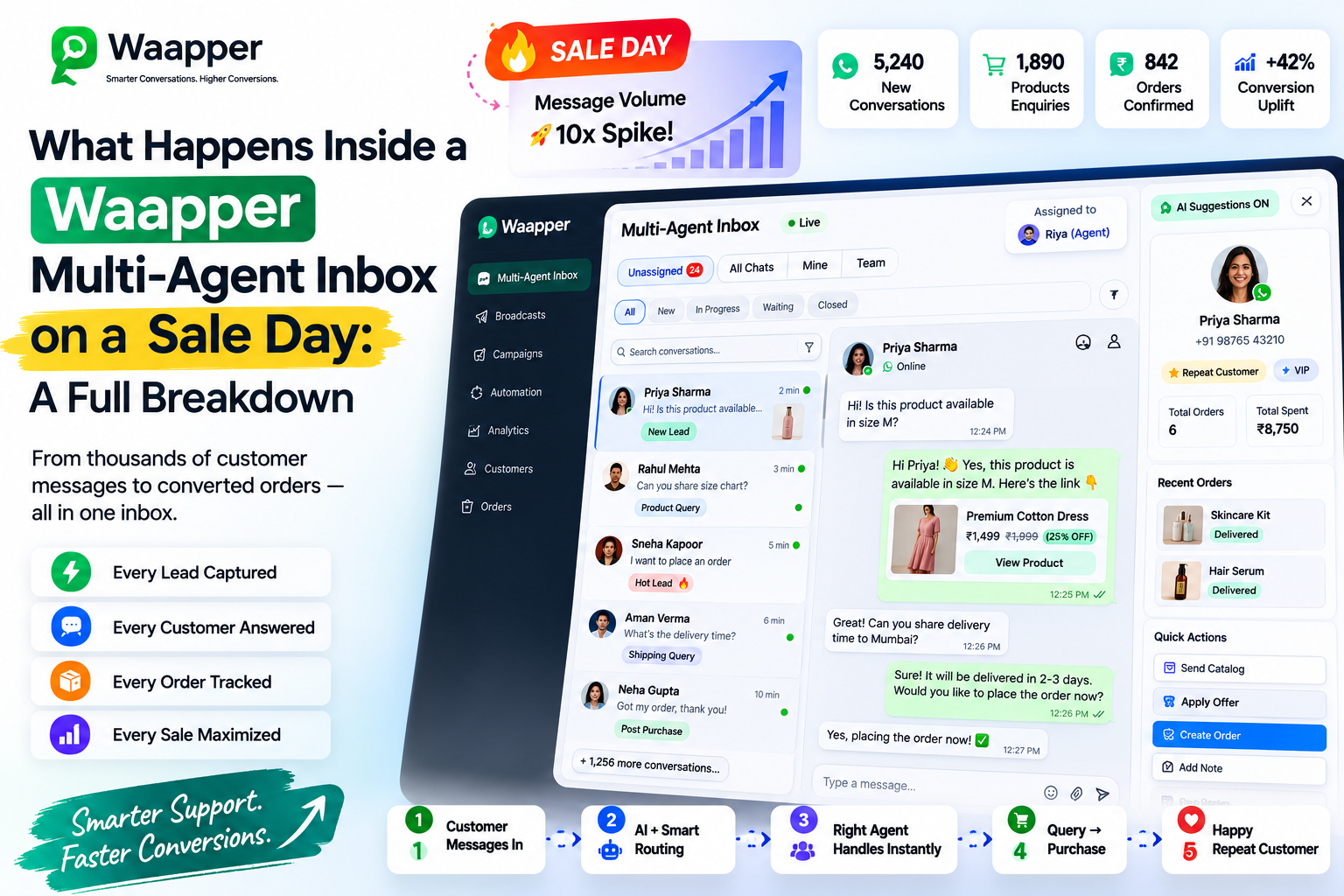
Picture your brand's biggest sale of the month.
You have been building to it for two weeks. The offer is live. The announcement went out on Instagram and email this morning. Traffic is spiking. Orders are coming in.
And your WhatsApp is on fire.
200 conversations in four hours. Customers asking about delivery timelines, size availability, bulk order pricing, return policies, payment failures, and discount applicability. Each of them wants a fast answer. Each of them made a decision to message rather than abandon because messaging felt easier than navigating an FAQ page.
That decision is a trust signal. It is also the moment where most D2C brands, despite everything they have invested in getting customers to this point, let those customers down.
Not because the team is not trying. Because the infrastructure is not built for this volume.
This piece breaks down exactly what happens inside a Waapper multi-agent inbox when 200 conversations hit at once, how the chat assignment logic works, and why the right infrastructure on sale day is the difference between converting that traffic into revenue and watching it walk to a competitor.
The Shared Phone Problem
Before understanding what a multi-agent inbox does, it helps to understand what it replaces.
The default setup for most D2C brands managing WhatsApp customer communication is a single business number accessed by two to four team members, typically through one logged-in device or a shared phone that circulates between agents.
This setup has a fundamental architectural flaw. WhatsApp, in its standard form, is a one-to-one communication tool. It was not designed for multiple agents managing a shared inbox simultaneously.
When three agents share access to the same WhatsApp number during a high-volume period, the following things happen with near certainty.
-
Duplicate replies occur because Agent A did not know Agent B had already responded.
-
Conversations go unclaimed because each agent assumes another has picked them up.
-
High-intent customers leave before receiving a response.
The team is working hard. The infrastructure is working against them.
What Happens the Moment a Message Enters the Waapper Inbox
When a customer message arrives in the Waapper multi-agent inbox, the first thing that happens is identification.
The system checks whether this is a returning customer with previous conversation history or a new contact. This distinction matters immediately because it changes how the conversation should be handled.
A returning customer is routed back to the same agent whenever possible, preserving context and relationship continuity.
A new customer is automatically assigned based on message content, conversation trigger, and agent availability.
The assignment happens automatically within seconds. By the time an agent sees the conversation, it has already been identified, categorised, and assigned.
The Agent Experience During a 200-Conversation Sale Day
Inside Waapper, every agent sees only their own assigned queue.
Instead of scrolling through a shared inbox with hundreds of unread messages, agents receive conversations prioritised by response time and urgency.
Each conversation includes:
-
Customer name
-
Purchase history
-
Previous conversation history
-
Current message
Agents never need to switch systems or ask customers to repeat information.
Because every chat has a dedicated owner, duplicate replies are eliminated. Agents focus only on the conversations assigned to them, improving both response speed and response quality.
The Manager View in Real Time
While agents manage conversations, managers monitor the entire operation through a live dashboard.
The dashboard displays:
-
All open conversations
-
Assigned agent
-
Current response status
-
Waiting time
-
SLA breaches
If a conversation remains unanswered beyond the acceptable response window, managers can instantly reassign it to another available agent.
Instead of discovering problems after the sale ends, managers solve them while the sale is happening.
Intelligent Routing Beyond Basic Assignment
Waapper does far more than distribute conversations equally.
Routing rules can automatically send conversations based on intent.
Examples include:
-
Returns and complaints → Support agents
-
Delivery questions → Customer support
-
Bulk order enquiries → Sales team
-
VIP customers → Senior agents
-
Campaign-specific chats → Assigned campaign owners
Every agent receives the conversation with full context before opening it.
After Hours and Overflow Management
Sale traffic rarely follows office hours.
When conversations arrive outside business hours or during peak load, Waapper immediately sends an automated acknowledgement.
Customers receive:
-
Confirmation that their message has been received
-
Expected response time
-
Answers to common questions where applicable
When agents return, conversations are already prioritised, ensuring the most urgent enquiries are handled first.
What the Data Shows After a Sale Day
Once the campaign ends, Waapper provides detailed performance analytics, including:
-
Conversations handled per agent
-
Average first response time
-
First-contact resolution rate
-
Escalated conversations
-
Agent performance comparison
These insights help brands optimise staffing, improve workflows, and prepare more effectively for future campaigns.
Across brands using Waapper, moving from a shared WhatsApp device to the Multi-Agent Inbox consistently reduces response times by 60–70% during high-volume sales.
The team size remains the same.
The infrastructure changes everything.
The Sale Day Standard Your Brand Should Hold
Every customer who messages your brand during a sale has chosen to engage instead of leaving.
They deserve a fast, informed, and personalised response from an agent with complete context.
A shared phone cannot consistently deliver that experience.
Waapper's Multi-Agent Inbox can.
Every conversation assigned.
Every agent focused.
Every manager informed.
Every customer receiving the experience that turns a sale-day enquiry into a completed order and a repeat customer.
Visit waapper.com to see how the inbox works for your team.